-1.png?width=150&height=40&name=InfoPlus-Primary-Logo%20(1)-1.png)
To integrate your Amazon shopping cart into InfoPlus, Extensiv's e-commerce shopping cart integration application is required. Extensiv's step-by-step guide, Setting Up InfoPlus Commerce provides instructions needed to integrate your Amazon Extensiv Account into InfoPlus.
This connection only supports seller-fulfilled orders, the orders you pack and ship yourself. It does not support Fulfillment by Amazon (FBA) orders.
NOTE: Company Identifier (Noted in Extensiv's step-by-step guide) is your InfoPlus Domain URL when accessing your InfoPlus Account (Example, companyname.infopluswms.com).
- API Key: Generated from the User table by creating Extensiv as a User. NOTE: The Extensiv User must have Permissions for the LOBs associated with it.
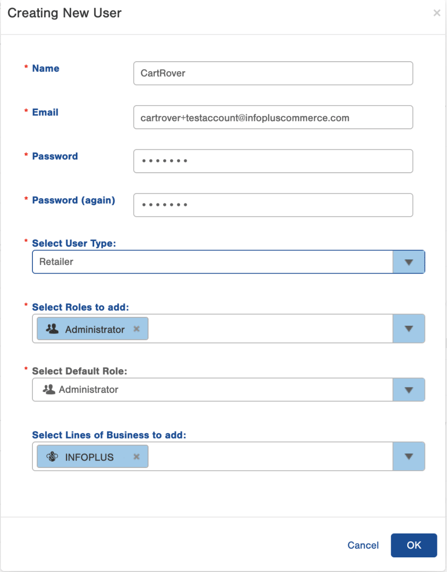
- After the user is created Create an API Key:

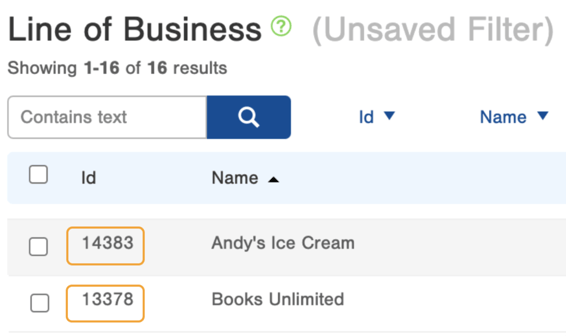
- Line of Business ID: Located in InfoPlus on your Line of Business table (Learn more about LOBs). NOTE: This can be set to your LOB if you are a 3PL, then at the Cart Level you can assign what LOBs need to be added for your clients.
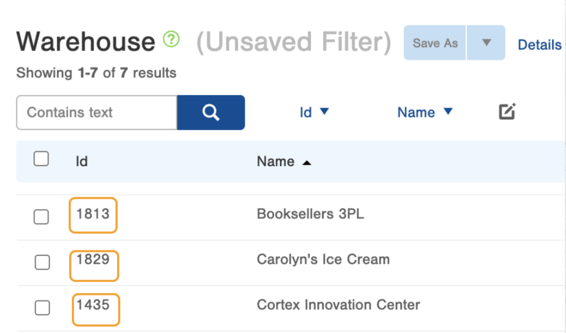
- Warehouse ID: Located in InfoPlus on your on your Warehouse table (Learn more about Warehouses).
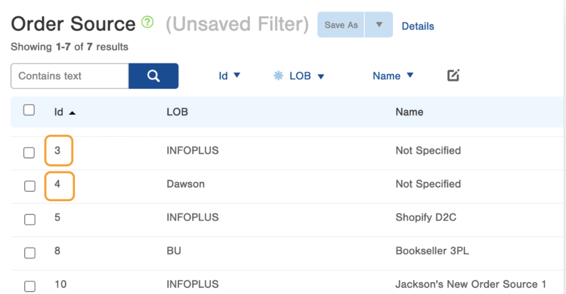
- Order Source ID: Located in InfoPlus on your on your Order Source table (Learn more about Order Sources).
NOTE: By default, InfoPlus does not detect and reject duplicate orders, see article Disable Duplicate Customer Order Numbers and SKUs; set Incoterms and other functions of the Order Property Table for guidance to Prevent Duplicate Orders in InfoPlus.