-1.png?width=150&height=40&name=InfoPlus-Primary-Logo%20(1)-1.png)
A Receiving Criteria Scheme is applied at the Item level and controls what fields warehouse staff are prompted to fill in when receiving inventory using the Modern App. Each field in the scheme can be set to Disabled, Optional, or Required, giving you precise control over your receiving process on a per-item basis.
Create a Receiving Criteria Scheme
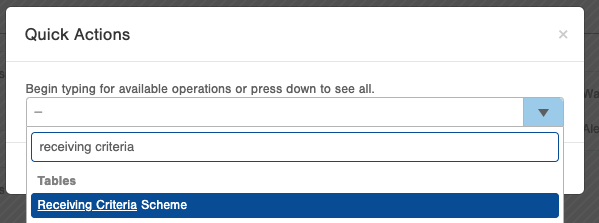
1. Navigate to the Receiving Criteria Scheme table in Infoplus using the Quick Actions menu.
2. Select the Create New button in the top right corner.

3. Enter a Name for your Receiving Criteria Scheme.
/CreateNewReceivingCriteriaScheme.png?width=670&height=489&name=CreateNewReceivingCriteriaScheme.png)
4. Configure each field by setting it to one of three options:
-
- Disabled – The field will not appear during the receiving process.
- Optional – The field will appear but does not need to be filled in.
- Required – The field must be filled in before the receiving process can be completed.
The following fields are available to configure:
| UOM | Unit of Measure for the inventory being received. |
| Units per Wrap | The number of single units that make up a wrapped unit. |
| Units per Inner Pack | The number of single units that make up an inner pack. |
| Units per Case | The number of single units that make up a case. |
| Units per Pallet | The number of single units that make up a pallet. |
| Production Lot | The production lot associated with the inventory. |
| Product Id Tag | The product ID tag associated with the inventory. |
| Revision Date | The revision date of the inventory. |
| Expiration Date | The expiration date of the inventory. |
| Dock Date | The date the inventory physically arrived at the warehouse dock. Useful for tracking inventory that sits in the warehouse before being formally received. See the Dock Date section below for more details. |
| Country of Origin |
The country of origin for the inventory. Note: This is required when shipping inventory internationally. |
| Weight per Wrap | The weight of a wrapped unit of inventory. |
| Weight per Case | The weight of a case of inventory. |
| Carton Width | The width of the carton. |
| Carton Length | The length of the carton. |
| Carton Height | The height of the carton. |
5. Once configured, apply the Receiving Criteria Scheme to an Item:
-
- Navigate to the Item table using the Quick Actions menu.
- Open the item you want to edit using the double arrows to the right of the item record.
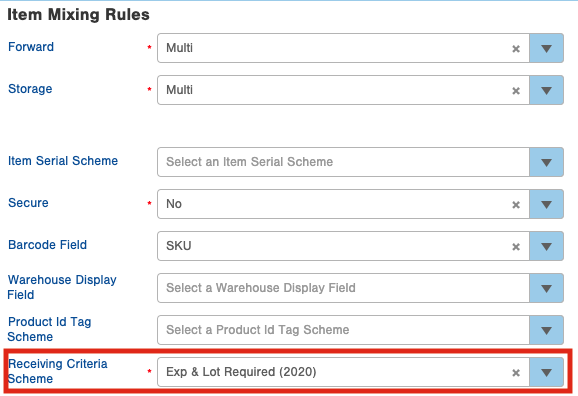
- Under the Operations tab, select the desired Receiving Criteria Scheme.
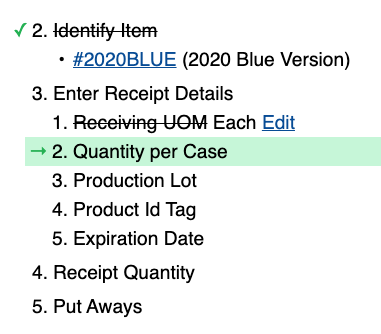
6. Test your Receiving Criteria Scheme by receiving an item in the Modern App. Navigate to Inventory > Receiving, enter an item SKU or ASN number, and follow the receiving flow to confirm your scheme is working as expected.
Dock Date
Inventory doesn't always get received on the same day it arrives at the warehouse. The Dock Date field allows warehouse staff to record the date inventory physically arrived at the dock, separate from the date it was formally received in Infoplus.
To enable Dock Date capture, set the Dock Date field on the Receiving Criteria Scheme to either Optional or Required. Once enabled, warehouse staff will be prompted to enter the Dock Date when receiving in the Modern App.
Please Note: Quick Receipts do not follow the Receiving Criteria Scheme assigned to an item. If Dock Date is set to Required, users will still be able to complete a Quick Receipt without entering a Dock Date.
Edit/Delete a Receiving Criteria Scheme
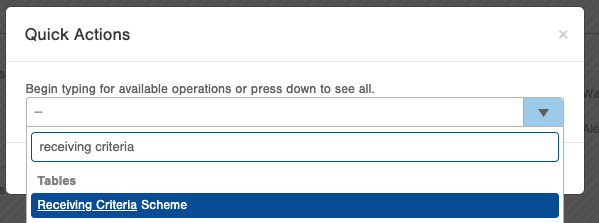
1. Navigate to the Receiving Criteria Scheme table using the Quick Actions menu.
2. Select the double arrows to the right of the scheme you wish to edit or delete.
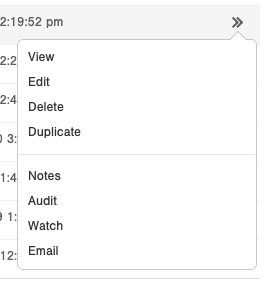
3. Choose your action:
-
- Edit – Update any of the field settings as needed.
- Delete – The Receiving Criteria Scheme must be removed from all associated Item records before it can be deleted.
