.png?width=225&height=60&name=Logo%20(7).png)




This Week’s Release: Order Source Reservations, Scheduled Plans and Mobile App Improvements.
What's New in InfoPlus
This release brings enhancements and fixes across inventory accuracy, warehouse operations, order management, and international shipping.
Here's what's new:
Inventory Accuracy
Full warehouse visibility on the inventory tab & in shopping cart connections
The Warehouse Inventory tab on an item now displays every one of your warehouses instead of being capped at the first 10, giving you a complete and accurate picture of where your stock lives. Just as importantly, inventory in warehouses beyond the first 10 now syncs to your shopping cart connections, so the availability shown to your shoppers reflects your true on-hand quantity.
Orderable quantities for substitutions
Users sometimes experienced a delay in orderable quantity recalculating for substitutions. That issue has been resolved and your shopping cart will now reflect available substitute inventory right away.
More accurate usage tracking when unfulfilling orders
Unfulfilling an order flagged as Alternate Usage now updates the Item Usage table accurately. Previously this usage wasn't always adjusted correctly, which could throw off your totals.
Warehouse & Fulfillment Operations
Production lot and item details now visible in the mobile app
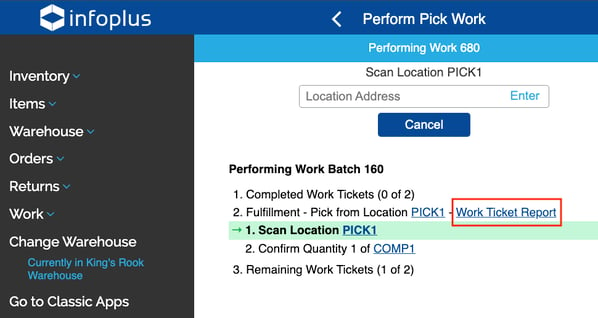
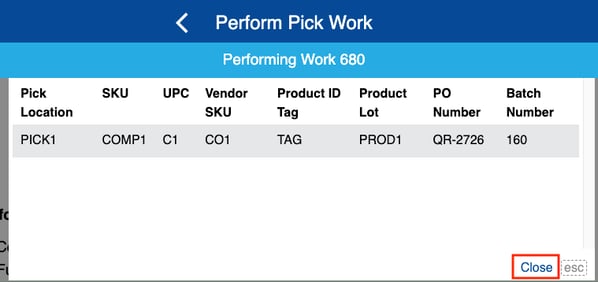
Pickers can now see key fulfillment ticket details — UPC, Vendor SKU, Product ID Tag, and Production Lot — directly within Pick Work in the Mobile Floor App. This information previously appeared only on the printed pick ticket, so lot-sensitive picking is now easier and more accurate on the floor.
While picking via the mobile app click the "Work Ticket Report" link
The following information will display in the pop up. To close the screen click Close in the lower right corner of the pop up.
Bulk load complete kit assembly instructions
Previously when bulk loading kits the instructions couldn't be bulk loaded. This has now been resolved and you can now bulk load your kits' complete assembly instructions.
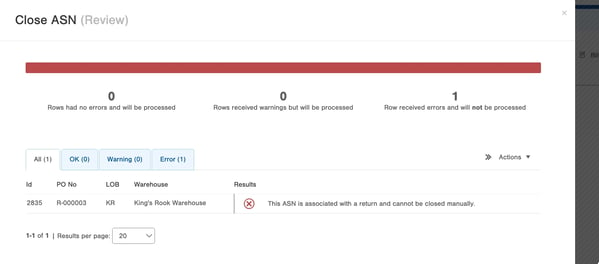
ASNs for Return orders cannot be manually closed
Return Order ASNs will no longer be allowed to be manually closed. This ensures the return process is followed and orphan records are not created within the return process. When attempting to manually close a return ASN the user will see the following error message.
Order Management & Auditing
Carrier changes now tracked in the order audit log
Any change to an order’s carrier is now recorded in the Order Audit log, capturing the previous carrier, the new carrier, the timestamp, and who (or what) made the change. This closes a gap in the audit trail and makes it much easier to track down when and why a carrier was changed.
Customer orders tab now limited by line of business
Previously, a customer with the same customer number across different LOBs within a client site could see all orders for that customer number regardless of line of business. That issue has been resolved and the orders tab on a customer record now shows only orders from the Line of Business you are currently viewing.
International Shipping
Customs descriptions auto-fit the new USPS Ship API
For international orders shipping through the new USPS Ship API, customs item descriptions are now automatically shortened to the 30-character limit the API requires. This prevents labels from being rejected because a customs description was too long.
Customs price defaults now apply to KOD items
An item's default customs price now applies correctly to KOD (kit-on-demand) items. Previously, a KOD order with no price could send 0 for every kit component; now, when no price is present, it falls back to the price listed on the Kit SKU for customs documentation.
Performance & Stability
Orders with oversized weight values no longer stuck in pending
We resolved an issue in which an unexpectedly large weight value could interrupt order queue processing and leave orders stuck in a Pending status. Order processing is now protected against this condition so the queue keeps moving. The system will default to a weight that allows the order to continue processing allowing you to intervene once the order lands in InfoPlus.
On The Horizon!
Shopify Version 2 and TikTok Shop
Both integrations are in active development and on track to launch ahead of the busy season. These are significant builds, so we're focused on getting them right — and we'll share a full rollout plan with timing as we get closer. Thanks for building with us.
B2B & B2C for EU shipments
Ahead of the EU shipping changes taking effect November 1, 2026, we've added new order property overrides that let you classify shipments as B2B or B2C. By default, InfoPlus will treat all orders as B2C, so no action is needed for consumer shipments. If you ship B2B, you'll use the order property override to flag those orders. You can begin setting these overrides up now to get ahead of the change — just note they won't be fully operational until we've connected them with our shipping partners. We'll share more details as that work progresses.
Your Success, Our Priority
Our Commitment to You
Behind every release is a simple commitment: to listen, to keep improving, and to make sure InfoPlus works the way your business needs it to. Whether it's a major new capability or a small refinement, we're focused on delivering real value to you with every update, and on being here whenever you need us.
Pro Tips from the InfoPlus Team 💡
We're sharing quick tips to help you get the most out of InfoPlus — straight from the team that knows it best.
Pro Tip 💡: Inventory on a recent ASN showing unavailable?
Check the items' Receipts tab before assuming a count problem. These receipt states hold inventory as unavailable, even when the units are physically sitting in the location:
- Frozen status - Any receipt marked Frozen has its full quantity flagged unavailable.
- A Distribution Date set in the future - That quantity stays unavailable until the date arrives.
Read: Inventory Troubleshooting →
Have Questions or Need Support?
When an immediate need can't wait, our Pro Services team can work with you directly to bring your vision to life on your timeline. And for everything in between — questions about these updates, troubleshooting, or exploring what's possible — our support team is here to help you get the most out of every release. Through our Evergreen Enablement Program, we're committed to making sure you always have access to the training, resources, and guidance you need as your business grows and evolves.
However you need us, we're with you every step of the way.
Submit a Pro Services Request
Submit a Support Ticket